Staff
Pay-station middleware
Runs the lane software and connects the screen, scanner and cash devices to NXT Wash.
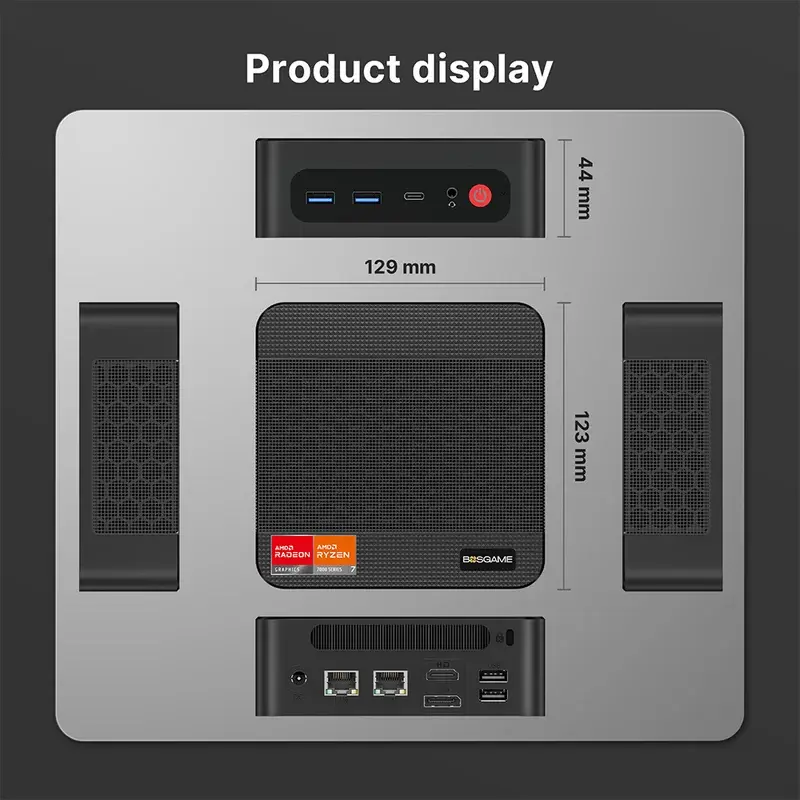
What it does
Runs the lane software and connects the screen, scanner and cash devices to NXT Wash.
Connections and installation
Use LAN 2, farther from power, for the Ethernet connection shown in the guide. The direct-display retrofit uses HDMI for video and USB for touch.
Guides and references
- NXT Wash equipment connections
- Middleware startup and dependency errors
- Kiosk screen is blank, frozen, or missing the keyboard
Getting help
Contact WWX Support: (401) 209-1110 or submit a ticket. Only White Water technicians contact NXT Wash. Report the location, lane number, symptom, and which functions still work.
Middleware installer and commands
Install and commission middleware, or open the command reference for logs, service checks, updates, certificates and cash maintenance.