Card reader is not ready
Recognize the normal Welcome screen, distinguish cancellation messages from reader faults, and collect useful support details.
Applies to
PAX IM30, A77, and A35 devices. Menus and behavior can vary by device and deployed software.
Normal idle screen
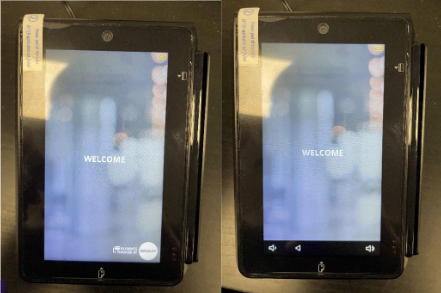
All credit card readers normally sit on the Welcome screen when idle, including the PAX IM30, A35 and A77.
A message such as “Transaction cancelled” does not, by itself, mean there is a problem with the reader. Distinguish the transaction message from an actual failure to accept payments.
First checks when a payment problem occurs
- Record the exact message and whether the reader has power.
- Identify the device serial number, site, and where it is used: kiosk, POS, or tablet.
- Record whether the problem is isolated to this reader.
- Report those details through White Water channels before changing payment settings. Only White Water technicians contact NXT Wash.
Message guide
| Message or behavior | Meaning or documented clue | Next step |
|---|---|---|
| Welcome | Normal idle screen for all credit card readers. | Continue normal use. |
| Transaction cancelled | A transaction message; by itself it does not indicate a reader fault. | Investigate only if there is an actual payment problem, using the exact behavior and message. |
| Main App Initializing, Please wait then retry | The device may not have been added to the processor account. | Ask the NXT Wash payments team to check provisioning. |
| Device is not initialized | Network readiness or opening Get Parameters too quickly can cause this. | Have support check connectivity and DCDirect readiness. |
| PSCS Parameters not found in NXT Wash logs | Parameters may need refreshing. | Use the technician article with support. |
| Reader reboots during operating hours | Check the scheduled restart time. | Ask support to verify the time zone and schedule. |
Recovery check
After support restores the reader, have the authorized operator confirm the reader returns to the Welcome screen when idle and complete the site's approved test process.
Still unresolved
Send the serial number, error, time, location, and checks performed using the site's established support channel.